New in Agave: Vendor Statement Reconciliation

New in Agave: Vendor Statement Reconciliation
We’re excited to share Vendor Statement Reconciliation, which reads every vendor statement a contractor receives, matches each invoice on it against the bills already in their ERP, and flags the missing invoices, wrong amounts, wrong dates, and mismatched invoice numbers automatically.
What's new
- Vendor statements arrive by email forwarding rule or direct upload, and Agave extracts every invoice on them
- Agave matches each extracted invoice against the ERP and against invoices still moving through Agave AP Invoice Automation, then flags any discrepancies
- Available today as a paid add-on for Agave customers
Why unreconciled vendor statements cost contractors money
A vendor statement is the supplier's version of the truth: every invoice they think they sent you, and every dollar they think you owe. Reconciling it against your own books is how a contractor finds the invoice that never made it to AP, the credit memo that was never applied, and the duplicate that got paid twice.
Almost nobody does it consistently, and we understand why. Statements land in a shared AP inbox from a few hundred suppliers, each in its own format, each on its own cycle. Reconciling one by hand means opening an ERP, searching invoice numbers one at a time, and comparing amounts in a spreadsheet. Most AP teams we talk to reconcile the ten vendors they're worried about and let the rest go.
How Vendor Statement Reconciliation works
Agave Vendor Statement Reconciliation ingests statements two ways: contractors set up an email forwarding rule so vendor statements route to Agave automatically, or they upload a statement file directly. Agave then extracts every invoice on the statement: invoice date, invoice number, and amount — and matches those against two sources at once: the invoices already recorded in the contractor's ERP, and the invoices still moving through Agave AP Invoice Automation.
That second source matters most in practice. An invoice that arrived last week and is sitting in coding review is not in the ERP yet, so a reconciliation tool that reads only the ERP calls it missing. Agave matches against in-flight invoices too, so the statement shows what the contractor actually has, not just what has posted.
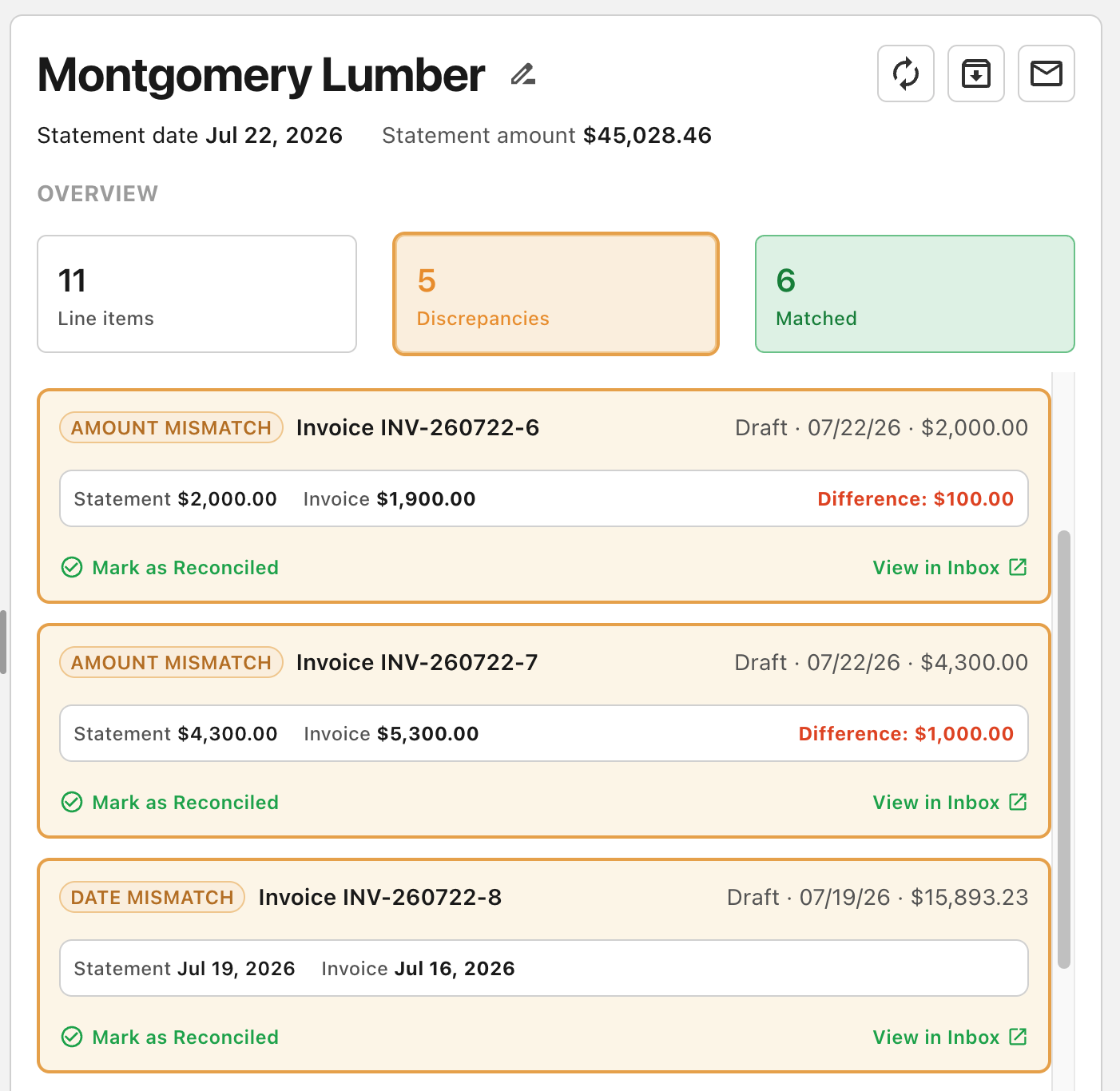
Every statement becomes a row in one list under one of two statuses. Reconciled holds the cleared statements as a searchable history. Discrepancies holds the statements with something outstanding — the AP team's to-do list. Opening a statement puts the vendor's version on the left and Agave's matches on the right, discrepancies first and matched invoices below.
What counts as a discrepancy?
Agave Vendor Statement Reconciliation flags four types:
- Missing invoice. The invoice appears on the vendor's statement, and Agave cannot find it in the ERP or in AP Invoice Automation. This is the one that costs real money, and it's usually an invoice that was emailed to a PM and never forwarded to accounting.
- Amount mismatch. The invoice number and date match, but the amount doesn't, usually a retainage or sales tax difference, sometimes a credit memo the vendor hasn't applied.
- Date mismatch. The invoice number and amount match, but the dates differ, which changes discount terms, mechanics lien timing, and which period the cost belongs to.
- Invoice number mismatch. The amount and date match, but the number doesn't quite. Frequently this is formatting: an extra dash, extra spaces, a prefix the vendor added. Agave surfaces it rather than guessing, so a clerk can confirm in a second and mark it reconciled with a comment like "the invoice is correct" that stays attached to the statement for whoever looks at it next.
What to look for in vendor statement reconciliation software
These are the questions worth asking any vendor in this category, including us.
- Does it match against in-flight invoices, or only the ERP? An invoice in coding review is not in the ERP. A tool that reads only the ERP will report it as missing, and a false missing-invoice flag is more expensive than no flag at all, because someone has to chase it.
- Does it handle near-matches, or only exact ones? Vendors reformat invoice numbers constantly. Exact-string matching turns every extra dash into a missing invoice. Ask what happens when the amount and date match and the number is off by a character.
- Which ERPs, including on-prem? A large share of contractors run ERPs hosted or on-prem environments with no native API. Cloud-only support excludes them. Ask for the list by name.
- Does the reconciliation stay live? A statement reconciled against Tuesday's data and never re-checked is a document, not a control. Ask whether new and edited invoices flow back into statements already reviewed.
- Is the audit trail on the statement? When a clerk decides a mismatch is acceptable, the reason needs to live with the statement, not in an email thread. Ask where comments and reconciliation decisions are stored and who can see them.
- How does the vendor conversation happen? Most discrepancies end in an email to the supplier. Ask whether the tool drafts it in your format, or whether someone retypes the list into Outlook.
Availability
Vendor Statement Reconciliation is generally available today as a paid add-on for Agave customers.
About Agave
Agave is the AI platform for construction financials, built to work seamlessly with the systems contractors already use. It serves general and specialty contractors, connecting more than 14 ERP and project management systems across cloud, hosted, and on-prem environments. Agave's products include cross-system data integration and AI tools for AP automation, expenses management, vendor compliance, analytics and agent building. Profitable and backed by Accel and YCombinator, Agave is used by more than 500 contractors across North America today.